WooCommerce Subscriptions is the most common way WordPress stores sell recurring products, and it is also where the UK subscription rules 2027 catch many small businesses by surprise. From 1 January 2027, any WooCommerce subscription entered into by a UK consumer must come with key pre-contract information, reminder notices, straightforward online cancellation and 14-day cooling-off refunds, wherever the store is based.
This guide covers what WooCommerce does and does not do out of the box, and the plugins or custom code that close the gaps. It is general information, not legal advice.
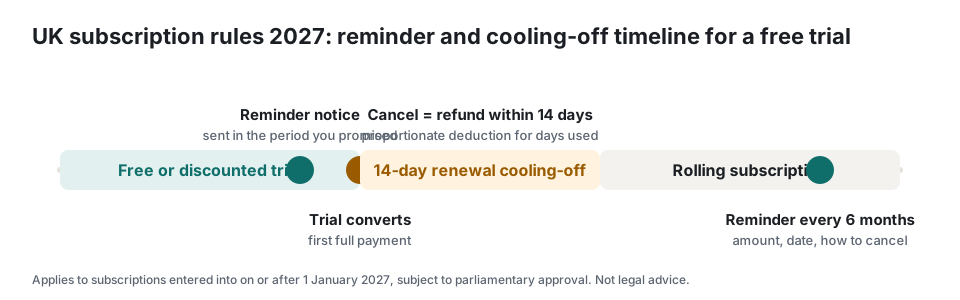
What WooCommerce Subscriptions does not do by default
WooCommerce Subscriptions handles recurring payments, trials and renewals well, but at the time of writing it has no native renewal reminder email. Its own feature request page points to a separate paid reminder extension. The customer can cancel from My Account, but the button is often turned off by store settings, and nothing produces the key-information panel the rules require. So a standard WooCommerce store fails three of the four duties until configured.
Small plugins have started to appear for exactly this, such as Renew Forge, which adds a one-press cancel button and a cancellation log, with reminders and cooling-off handling in a paid tier. Custom code via WooCommerce hooks is the other route.
1. Key information at WooCommerce checkout
Add a block above the Place order button, and on the product page, that states the recurring price and frequency, the minimum total, the trial end date and post-trial price, your reminder schedule, how to cancel and the cooling-off right. Use the subscription product's own fields so the panel always matches the charge. Keep it in the normal page flow, readable without expanding anything, on mobile too.
2. Renewal reminder emails in WooCommerce
You need a reminder before a trial converts, before any renewal of 12 months or more, and at the end of each six-month period on rolling plans. Build them with WP-Cron or Action Scheduler keyed to the subscription's next payment date minus your stated lead time, or use a reminder plugin. Each email must be a standalone transactional message whose subject makes the purpose obvious, stating the date, amount and how to cancel. Store the send time and content against the subscription as evidence; card-scheme disputes are far easier to win with that log.
Whatever lead time you choose must be written in the key information and then met every time.
3. The My Account cancel button
Turn on the customer-facing cancel action in WooCommerce Subscriptions settings and make the button visible on the subscription view. Remove any snippet that forces a reason, a phone call or a waiting period. If you show a retention offer, give it an equal-weight No thanks, cancel button. Send a confirmation email with the end date, and log the cancellation.
4. Cooling-off refunds in WooCommerce
Refund within 14 days of a cancellation made inside a cooling-off window, to the original payment method. WooCommerce refunds through the payment gateway from the order screen. For the renewal cooling-off after a trial converts or an annual plan renews, calculate the proportionate amount for days used and record how you got there. Add a dashboard note or reminder so no refund passes day 10 unprocessed.
Implementation checklist for WooCommerce
- Add a key-information block to the product page and checkout, fed by the subscription product fields.
- Install or build reminder emails: trial end, 12-month renewal, and six-monthly for rolling plans; log each send.
- Match the reminder lead time in the key information, the terms and the scheduler.
- Enable and surface the My Account cancel button; remove forced reasons or support-only cancellation.
- Send a cancellation confirmation with the end date; keep a cancellation log.
- Document a cooling-off refund procedure with pro-rata rules and a 14-day deadline.
- Store the terms version and checkout snapshot on each order.
- Test the whole journey as a UK customer on a phone before 1 January 2027.
Score your current setup with the free 20-question readiness checklist, which gives a prioritised fix list you can hand to your developer. For the consumer side of the same rules, see the plain-English guide and the reminder timing FAQ.
Frequently asked questions
Does WooCommerce Subscriptions send renewal reminders?
Not by default at the time of writing. It sends renewal receipts after payment, not reminders before it. You need a reminder plugin, a custom scheduler or a compliance plugin that adds pre-renewal notices with the required content and a send log.
Do the UK subscription rules apply if my business is not in the UK?
Yes. The Digital Markets, Competition and Consumers Act applies to any trader whose commercial practices are directed at consumers in the UK, wherever the business is based. If you take UK customers, the rules apply to subscriptions those customers enter into on or after 1 January 2027.
Do I need to change existing subscriptions?
No. The draft regulations apply only to subscription contracts entered into on or after 1 January 2027. Existing subscriptions stay under the Consumer Contracts Regulations 2013, even when they renew. Your new checkout, reminders and cancel flow should be live for any customer who signs up from that date.