Stripe Billing powers most software subscriptions sold to UK customers, and from 1 January 2027 every new UK subscription billed through it must meet the UK subscription rules 2027: key information before purchase, reminder notices, online cancellation and two 14-day cooling-off periods with refunds. Stripe gives you the building blocks, but it does not make you compliant on its own.
This guide maps each duty to a Stripe feature or a piece of your own code. It is general information for product and engineering teams, not legal advice.
What Stripe gives you, and what it does not
Stripe's Customer Portal lets customers cancel online, which covers the easy-exit duty if you enable cancellation and avoid adding blockers. Stripe can send upcoming-renewal emails, but they are timed off the revenue-recovery settings and are not designed as statutory reminders with required content. At the time of writing Stripe has published jurisdiction-specific guides for Germany's cancel and withdrawal buttons but nothing equivalent for the UK rules, so the key-information screen, the reminder schedule, the six-monthly notices and the cooling-off refund logic are yours to build.
1. Key information on the paywall and Checkout
Show the key pre-contract information before the customer commits, separate from the terms and readable without clicking: that the plan renews automatically, the price and interval, the minimum total, the trial end date and post-trial price, when reminders will be sent, how to cancel and the cooling-off right. If you use Stripe Checkout, put the panel on your pricing or plan page immediately before redirecting, and use the custom text fields in Checkout to repeat the essentials. Generate the values from the Price object so they never drift.
2. Reminder notices from Stripe events
Schedule your own reminders. Use the subscription's trial_end and current_period_end to queue emails at your stated lead time before a trial converts, before a 12-month-plus renewal, and every six months on rolling plans. Each email must stand alone, make its purpose obvious in the subject, and state the date, amount and how to cancel. Store the send timestamp and a content snapshot keyed to the subscription ID. The lead time you choose must be the one you printed in the key information.
3. Online cancellation through the Customer Portal
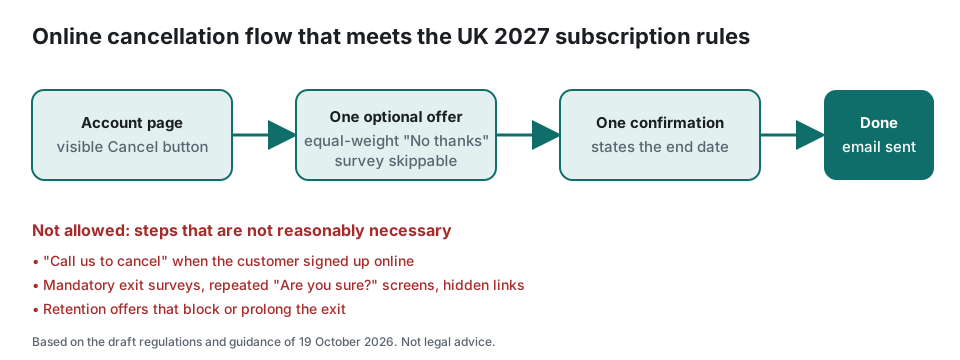
Enable cancellation in the portal configuration and link to it from a visible Cancel subscription control in your account area. Do not require a support ticket. Stripe's optional cancellation reasons must be skippable; a single retention offer is fine if the decline option is equally prominent. Send a confirmation email with the effective date. For cancellations inside a cooling-off window, cancel immediately and trigger the refund rather than at period end.
4. Cooling-off refunds with webhooks
On customer.subscription.deleted or your own cancel event, check whether the cancellation falls within 14 days of the subscription start, of trial conversion, or of a 12-month-plus renewal. If it does, create a refund to the original payment method within 14 days. For the renewal cooling-off you may deduct a proportionate amount for days used; compute it from the invoice period and store the calculation. Digital content supplied immediately keeps the existing express-consent approach for the initial period only.
Implementation checklist for Stripe
- Build a key-information panel on the pricing page and before Checkout, generated from Price objects.
- Queue reminder emails from trial_end and current_period_end at your stated lead time; add six-monthly notices for monthly plans.
- Log every reminder send with timestamp and content against the subscription ID.
- Enable Customer Portal cancellation and link it from a visible account control; make reasons optional.
- Send a cancellation confirmation stating the end date.
- Implement a webhook that detects cooling-off cancellations and issues refunds within 14 days, pro-rated where allowed.
- Record the terms version and key information shown at purchase.
- Review the final GOV.UK guidance before 1 January 2027 and adjust.
Score your current setup with the free 20-question readiness checklist, which gives a prioritised fix list you can hand to your developer. For the consumer side of the same rules, see the plain-English guide and the reminder timing FAQ.
Frequently asked questions
Does enabling the Stripe Customer Portal satisfy the online cancellation rule?
Largely yes for the exit mechanism, provided cancellation is enabled, the link is visible in your account area, and you do not add surveys or support steps in front of it. You still need the confirmation email, the reminder notices and the cooling-off refund logic, which the portal does not provide.
Do the UK subscription rules apply if my business is not in the UK?
Yes. The Digital Markets, Competition and Consumers Act applies to any trader whose commercial practices are directed at consumers in the UK, wherever the business is based. If you take UK customers, the rules apply to subscriptions those customers enter into on or after 1 January 2027.
Do I need to change existing subscriptions?
No. The draft regulations apply only to subscription contracts entered into on or after 1 January 2027. Existing subscriptions stay under the Consumer Contracts Regulations 2013, even when they renew. Your new checkout, reminders and cancel flow should be live for any customer who signs up from that date.