If your iOS or Android app sells auto-renewing subscriptions to users in the UK, the app subscription UK rules 2027 apply to you as the trader, even though Apple or Google takes the payment. From 1 January 2027 a UK user who subscribes in your app is entitled to key information before committing, reminders before a trial converts or a long plan renews, a straightforward way to cancel, and 14-day cooling-off refunds.
Many founders assume the app-store framework does the legal work for the UK subscription rules 2027. It does part of it. This guide separates what the stores already do from what you must add in your paywall and support process. It is general information, not legal advice, and store policies change, so check the developer documentation linked at the end.
What Apple and Google already do
Both stores let users cancel from their store account settings, and Google Play's developer policy requires apps to link to the Play subscription centre or your own cancellation flow. Google Play emails users before a free trial ends and before longer-term renewals, and Apple sends renewal notices in some situations. Neither store produces the key pre-contract information screen the UK rules require inside your paywall, neither commits to the six-monthly reminders for rolling plans, and neither handles a UK cooling-off refund on your behalf. Google's policy explicitly puts the duty on developers to keep cancellation and refund policies compliant with applicable law.
1. The paywall is your key-information screen
Before the purchase sheet appears, your paywall must state plainly that the plan renews automatically, the price and interval, the minimum total, the trial length, end date and post-trial price, when reminders will be sent, how to cancel and the cooling-off right. Keep it on the paywall itself at readable size, not behind a link or a collapsed section. Pull prices from StoreKit or the Play Billing Library so the panel matches the store's charge in the user's currency.
2. Reminders you must send yourself
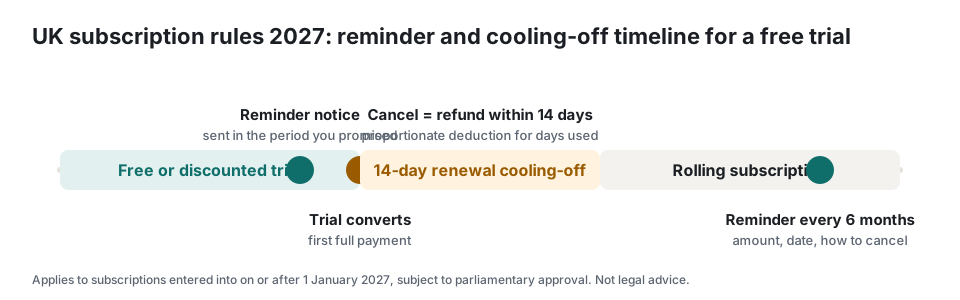
The stores' notices may cover some triggers, but the duty is yours and the timing must match what you promised. Use App Store Server Notifications and Google Play Real-time Developer Notifications to track trial end and renewal dates, and send your own reminder, by email or push backed by email, at the stated lead time before a trial converts, before a 12-month-plus renewal and every six months on monthly plans. Each reminder must state the date, amount and how to cancel, and be logged.
3. Cancellation inside the app
Put a visible Manage or Cancel subscription control in your app settings that deep-links to the store's subscription management page (Apple's manage-subscriptions URL or the Play subscriptions deep link). Do not route users to support or add confirmation steps of your own. Confirm the cancellation in writing when you receive the store notification, with the end date.
4. Cooling-off refunds through the stores
If a UK user cancels within 14 days of sign-up, trial conversion or a 12-month-plus renewal and asks for their money back, you must ensure a refund within 14 days. Apple controls refunds on iOS, so give users a clear path: your support team can direct them to Apple's refund request page, and you should process the cancellation and any entitlement changes immediately. On Android you can issue refunds from the Play Console or the Google Play Developer API, so build that into your support flow. Record each case, because a breach of the cooling-off duty extends the period by up to 12 months.
Implementation checklist for iOS and Android apps
- Rebuild the paywall with the full key-information block, populated from StoreKit or Play Billing prices.
- Subscribe to store server notifications and store trial end and renewal dates per user.
- Send your own reminders at the stated lead time: trial end, 12-month renewals, six-monthly on rolling plans; log them.
- Add a visible Cancel subscription control that deep-links to the store's management page.
- Send a cancellation confirmation with the end date when the store notifies you.
- Write a cooling-off refund procedure: Play Console or API refunds on Android, Apple refund guidance on iOS, 14-day deadline.
- Keep the paywall copy version and terms version per purchase as evidence.
- Re-check Apple and Google policy pages and the final GOV.UK guidance before 1 January 2027.
Score your current setup with the free 20-question readiness checklist, which gives a prioritised fix list you can hand to your developer. For the consumer side of the same rules, see the plain-English guide and the reminder timing FAQ.
Frequently asked questions
Apple takes the payment. Am I still the trader under the UK rules?
Yes. The user's subscription contract for your service is with you. Apple and Google act as the billing channel and offer some notices and cancellation tools, but the duties to inform, remind, allow straightforward cancellation and refund during cooling-off sit with the developer.
Do the UK subscription rules apply if my business is not in the UK?
Yes. The Digital Markets, Competition and Consumers Act applies to any trader whose commercial practices are directed at consumers in the UK, wherever the business is based. If you take UK customers, the rules apply to subscriptions those customers enter into on or after 1 January 2027.
Do I need to change existing subscriptions?
No. The draft regulations apply only to subscription contracts entered into on or after 1 January 2027. Existing subscriptions stay under the Consumer Contracts Regulations 2013, even when they renew. Your new checkout, reminders and cancel flow should be live for any customer who signs up from that date.