If your Shopify store sells subscriptions, subscription boxes or auto-renewing memberships to customers in the UK, the UK subscription rules 2027 apply to every subscription entered into on or after 1 January 2027. They apply whether your store is in London, Lahore or Los Angeles, because the law covers any trader selling to UK consumers.
This guide translates the rules into Shopify terms: what to show at checkout, which renewal reminder emails to send, how to add a one-click cancel button, and how to handle the new 14-day cooling-off refunds. It is general information, not legal advice. Use it with the free readiness checklist and have a solicitor review your final setup.
Why Shopify subscription sellers are affected
Shopify itself does not sell the subscription; you do. Shopify Subscriptions and apps such as Recharge, Skio, Loop, Appstle and Bold handle the recurring charge, but the legal duties under the Digital Markets, Competition and Consumers Act sit with the merchant. The draft guidance published by the Department for Business and Trade on 19 October 2026 makes the merchant responsible for pre-contract information, reminder notices, straightforward cancellation and cooling-off refunds.
At the time of writing we found no Shopify or major subscription-app documentation that addresses the UK 2027 rules specifically. Only small third-party apps, such as Subnotice, market UK reminder compliance. So assume you need to configure or build each requirement yourself.
1. Key information on the Shopify product page and checkout
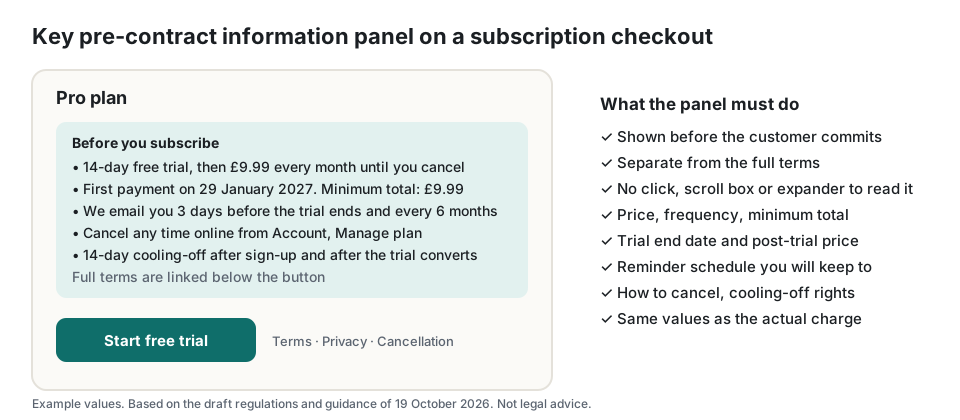
Before a UK customer commits, you must give the key pre-contract information separately from the full terms and without the customer taking extra steps to read it. On Shopify that means a plain panel on the product page or in the selling-plan selector, repeated at checkout, showing: that the plan renews automatically, the price and billing frequency, the minimum total payable, the trial end date and post-trial price if there is a trial, when you will send reminders, how to cancel, and the 14-day cooling-off right.
Most subscription apps let you add text to the selling-plan widget. Pull the values from the plan so they never drift from the actual charge. Do not hide them in an accordion, a pop-up or a scrolling box.
2. Renewal reminder emails for Shopify subscriptions
The rules require a reminder before a free or discounted trial converts, before a renewal that commits the customer to 12 months or more, and at the end of each six-month period on rolling plans. The timing is yours to choose, but it must be stated in the key information and then kept exactly. If you promise a reminder 7 days before, a reminder 2 days before is a breach.
Shopify Subscriptions sends a basic upcoming-order email; apps like Recharge and Skio have customisable upcoming-charge notifications. Check that each notice states the renewal date, the amount and how to cancel, goes out as its own email with its purpose obvious in the subject line, and is logged with a timestamp. If your app cannot do six-monthly reminders for monthly boxes, use Shopify Flow or a reminder app to add them.
3. A cancel button in the Shopify customer account
Because customers sign up online, they must be able to cancel online, in a straightforward way, without steps that are not reasonably necessary. The customer account portal of your subscription app should show a visible Cancel subscription control that completes the cancellation itself. Remove mandatory exit surveys, repeated confirmation screens and any requirement to email or call support. One retention offer with an equal-weight decline button is allowed.
Send a confirmation email with the end date and any final charge, and keep a log of cancellations. The regulator has said obstructive cancellation is a priority.
4. Cooling-off refunds on Shopify
Every UK subscription from 2027 gets a 14-day cooling-off period at the start, and a fresh 14-day period when a trial converts or a 12-month-plus plan renews. If the customer cancels inside the window you must refund within 14 days to the original payment method. For the renewal cooling-off you may keep a proportionate amount for the days of service used. Set up a refund process in Shopify admin or your app that your support team can run the same day, and record the dates so the pro-rata amount is auditable.
For physical subscription boxes, the existing goods-return rules continue to apply alongside these periods.
Implementation checklist for Shopify
- Add a key-information panel to the selling-plan widget and checkout, populated from plan data.
- Configure trial-end, 12-month renewal and six-monthly reminder emails with date, amount and cancel link; log every send.
- Write the reminder schedule into the key information and the terms, and match it exactly in the app settings.
- Enable a one-click Cancel subscription control in the customer portal; remove surveys and extra confirmations.
- Add a cancellation confirmation email with the end date.
- Create a cooling-off refund procedure with pro-rata calculation and a 14-day deadline alert.
- Snapshot the terms version and key information against each order for evidence.
- Re-check the final guidance on GOV.UK before 1 January 2027.
Score your current setup with the free 20-question readiness checklist, which gives a prioritised fix list you can hand to your developer. For the consumer side of the same rules, see the plain-English guide and the reminder timing FAQ.
Frequently asked questions
Do the UK subscription rules apply if my business is not in the UK?
Yes. The Digital Markets, Competition and Consumers Act applies to any trader whose commercial practices are directed at consumers in the UK, wherever the business is based. If you take UK customers, the rules apply to subscriptions those customers enter into on or after 1 January 2027.
Does Shopify Subscriptions or Recharge make my store compliant automatically?
No. They provide the billing mechanics and some notifications, but the content, timing and logging of reminders, the key-information panel, the cancel flow and the cooling-off refunds are your responsibility as the merchant. Configure each one and keep records.
Do I need to change existing subscriptions?
No. The draft regulations apply only to subscription contracts entered into on or after 1 January 2027. Existing subscriptions stay under the Consumer Contracts Regulations 2013, even when they renew. Your new checkout, reminders and cancel flow should be live for any customer who signs up from that date.